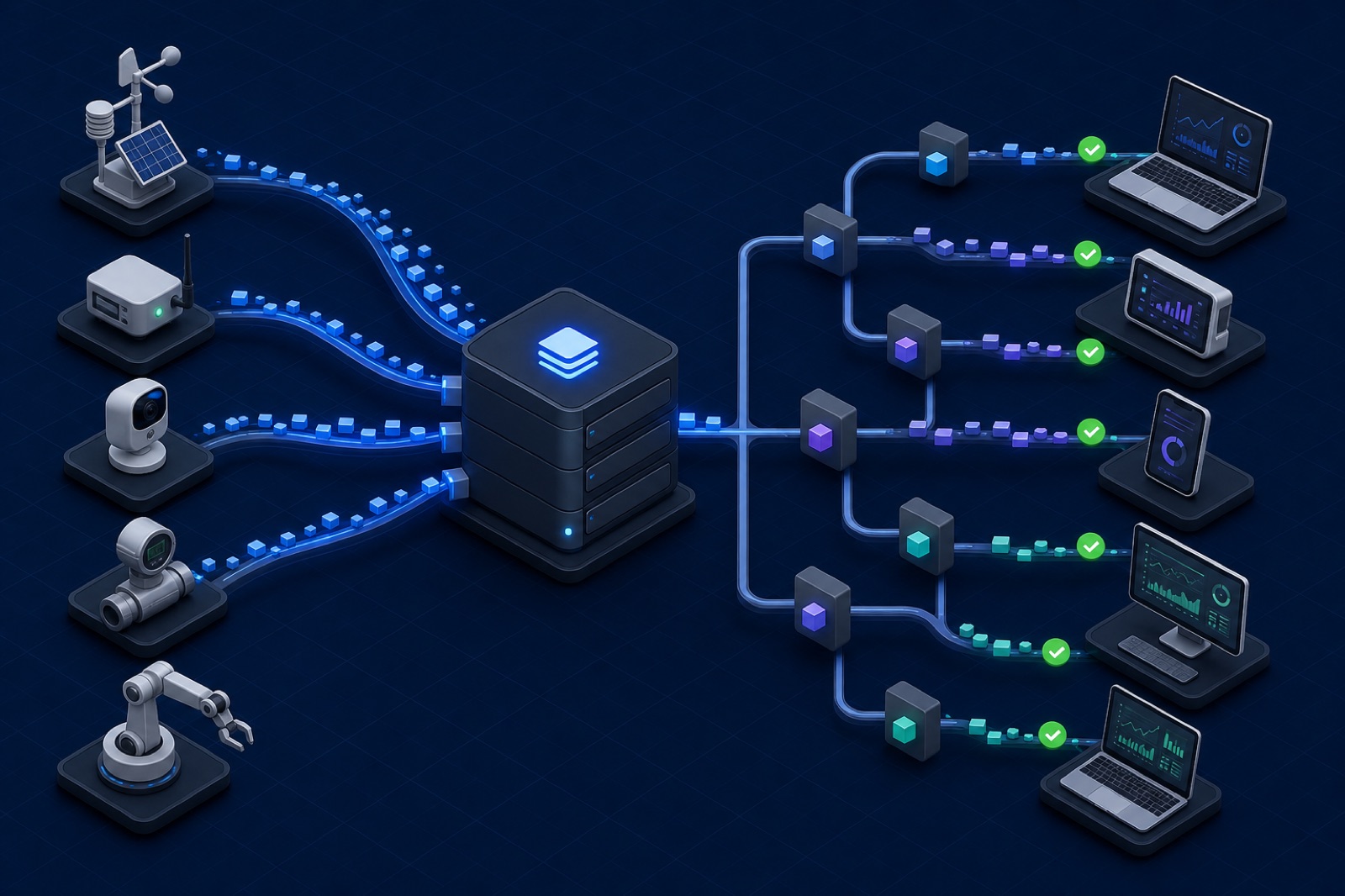
MQTT Quality of Service describes how a message is delivered between one client and the broker. It does not describe the quality of an entire application, and a higher number is not automatically a better choice.
The right QoS begins with a business question: what happens if this message is lost, duplicated, delayed, or processed twice?
QoS applies to each hop
QoS is negotiated independently on the publishing and subscribing sides.
A publisher may send at QoS 1, while a subscriber requested QoS 0. The broker delivers using the lower level available for that subscription. Likewise, a QoS 2 publish does not make a database transaction or physical actuator exactly once. It only defines the MQTT exchange on that network hop.
Treat the complete path separately:
device → broker → consumer → database or actuator
Every arrow and every processing step can fail in a different way.
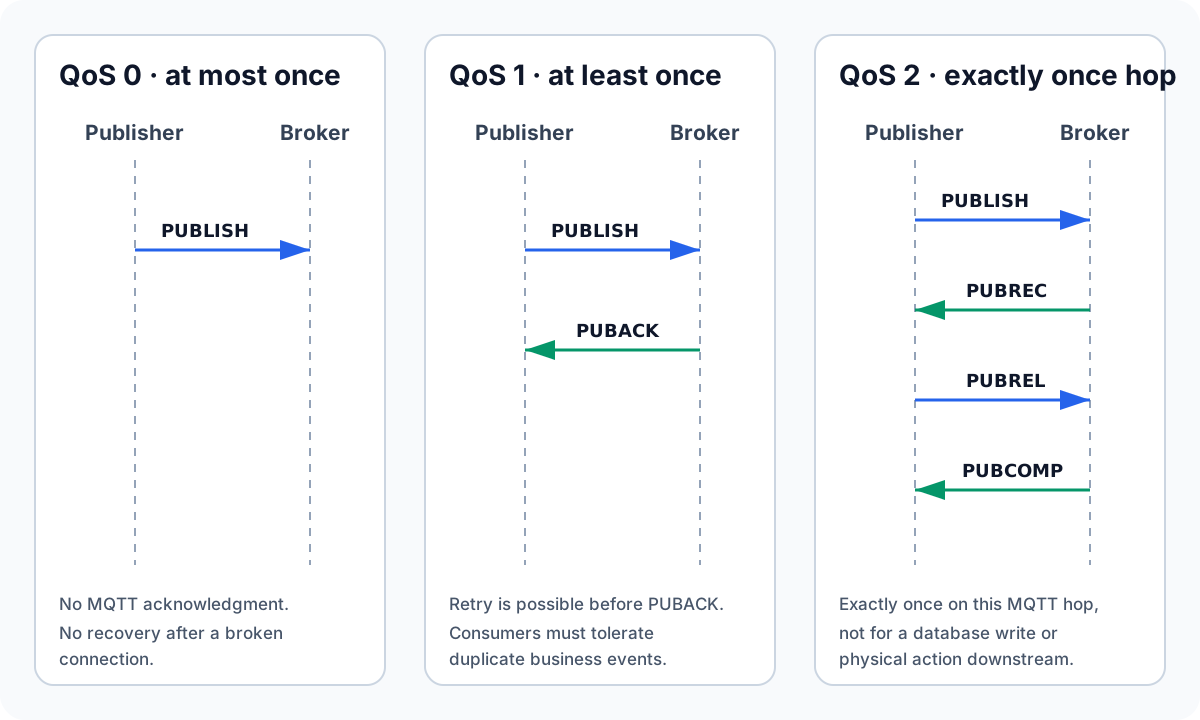
The diagram shows the publishing hop only. The broker starts a separate delivery exchange with each matching subscriber, limited by the lower of the published QoS and subscription QoS. A publisher receiving its acknowledgment does not prove that a subscriber, database, API, or actuator completed its work.
QoS 0: at most once
QoS 0 sends a PUBLISH without an acknowledgment. The message may arrive once or may be lost.
Use it for data that is:
- frequent;
- replaceable by a newer sample;
- inexpensive to lose occasionally;
- more valuable with low latency and low overhead.
Examples include a temperature reading every second, a live cursor position, or a high-rate debug metric.
QoS 0 is not unreliable by definition. A healthy TCP connection is already ordered and reliable while it remains connected. QoS 0 simply avoids MQTT-level recovery when the connection fails before delivery is complete.
QoS 1: at least once
QoS 1 requires a PUBACK. If the publisher does not receive it, the message may be sent again. The receiver must accept that duplicates are possible.
QoS 1 is a strong default for:
- alerts;
- state transitions;
- jobs and commands that include an idempotency key;
- measurements where a gap matters;
- events that can safely be deduplicated.
Design the payload for idempotency:
{
  "eventId": "01JZ8M7V2BR5H0R9BC2T2N2K0A",
  "deviceId": "pump-042",
  "type": "pressure.threshold.exceeded",
  "occurredAt": "2026-07-27T10:42:18Z",
  "value": 9.8,
  "unit": "bar"
}
A consumer can record eventId before applying the business effect. If the same event arrives again, it acknowledges the message without repeating the action.
QoS 2: exactly once at the protocol layer
QoS 2 uses a four-part exchange: PUBLISH, PUBREC, PUBREL, and PUBCOMP. Both sides keep state until the handshake is complete.
That cost is justified only when:
- duplicate delivery cannot be handled safely at the application layer;
- the broker and all relevant clients implement QoS 2 correctly;
- added latency, bandwidth, memory, and reconnect state have been measured;
- "exactly once" is required on the MQTT hop itself.
QoS 2 still cannot make a non-transactional side effect exactly once. If a consumer starts a motor and crashes before saving completion, the MQTT handshake cannot determine whether the physical action happened. Business-level idempotency remains necessary.
Reproducible MQTT QoS 0, 1, and 2 experiment
The RunMQTT QoS lab turns the protocol claims above into a repeatable local check. It uses Eclipse Mosquitto 2.0.22, MQTT.js 5.15.2, MQTT 5, and unique topics for every run. The broker is anonymous but bound only to 127.0.0.1:18883; it is disposable test infrastructure, not a production configuration.
Download the lab instructions, runner, Compose file, and Mosquitto configuration, or run them directly from the repository root:
docker compose -f public/examples/mqtt-qos-lab/compose.yaml up -d
pnpm mqtt:qos-lab
docker compose -f public/examples/mqtt-qos-lab/compose.yaml down
Recorded result
The following observations were recorded on 2026-08-09 with Node.js 24.14.0. They verify packet flow and failure behavior; they are not a latency, throughput, or broker comparison benchmark.
| Scenario | Observed result | What it demonstrates |
|---|---|---|
| Healthy QoS 0 publish | Publisher sent PUBLISH; subscriber received QoS 0 | No MQTT acknowledgment exists on this hop |
| Healthy QoS 1 publish | Publisher sent PUBLISH and received PUBACK; subscriber received QoS 1 | The publishing hop completed an at-least-once exchange |
| Healthy QoS 2 publish | PUBLISH → PUBREC → PUBREL → PUBCOMP; subscriber received QoS 2 | The publishing hop completed the QoS 2 state machine |
| Persistent subscriber offline | QoS 0 and QoS 1 were published; only QoS 1 arrived after session resumption | The broker queued the QoS 1 message for this configured persistent session |
| Consumer failure and repeated event ID | Three distinct QoS 1 publishes, one injected failure, one business effect total | Stable event IDs protect the business effect across retries and duplicates |
The final scenario intentionally sends the same business event three times. All three MQTT DUP flags are false because they are distinct publishes, yet the payload has the same eventId. The first handler attempt fails before applying the effect, the second applies it, and the third is skipped. This is why application idempotency must use a stable business identifier rather than the MQTT DUP flag.
For a separate run against a disposable RunMQTT provider Core, see the managed MQTT broker evidence. It records the same QoS packet exchanges together with TLS/WSS connection timing, persistent-session recovery, topic-policy allow/deny behavior, and a bounded QoS 1 message sample.
Limits and failure injection
The local run proves what this pinned client and broker configuration did. It does not prove that every broker has the same queue limits, expiry policy, persistence durability, or reconnect behavior. Repeat it with the production client version and broker settings before choosing a QoS.
MQTT.js can acknowledge an incoming packet before an asynchronous business handler commits its database work. A handler crash therefore does not guarantee broker redelivery. Put durable work in a transaction, inbox, or idempotent job boundary, and test a process kill between receipt and commit. For a network retry test, interrupt the publisher before it receives PUBACK or before the QoS 2 handshake completes, then inspect packet IDs and the DUP flag after reconnect.
MQTT QoS comparison: 0 vs 1 vs 2
MQTT QoS 0 vs 1 is primarily a tradeoff between recovery and overhead. QoS 0 sends once without an MQTT acknowledgment; QoS 1 retries until acknowledged and therefore requires consumers to tolerate duplicates. Choose QoS 1 when losing an event matters more than receiving it twice.
MQTT QoS 1 vs 2 is not simply “reliable” versus “more reliable.” QoS 1 uses a two-packet exchange and application-level idempotency; QoS 2 uses a four-packet protocol handshake to prevent duplicate delivery on one MQTT hop. QoS 2 still cannot make downstream side effects exactly once, so most production systems get a simpler and more complete result from QoS 1 plus an event or operation ID.
Use the matrix as a starting point, then verify the decision under the actual network, payload rate, client library, and broker configuration.
| Message | Suggested starting point | Reason |
|---|---|---|
| Sensor sample every second | QoS 0 | The next value replaces a missed sample |
| Last-known state synchronization | QoS 1 + retained | State matters and duplicates are harmless |
| Alarm event | QoS 1 | Delivery matters; deduplicate by event ID |
| Configuration update | QoS 1 + version | Apply only a newer version |
| Remote command | QoS 1 + operation ID + expiry | Avoid stale execution and duplicate effects |
| Financial or safety-critical action | Do not choose by table alone | Design the end-to-end transaction and safety model |
QoS and offline sessions
QoS 1 or 2 messages may be queued for a persistent session while a subscriber is offline, depending on broker and session settings. This can be useful, but it can also deliver obsolete work.
For commands, add:
- message expiry;
- a command or operation ID;
- the intended device identity;
- a creation time;
- a schema version;
- an acknowledgment topic or result event.
Then bound the broker queue. An unlimited offline queue is not durability; it is an unbounded backlog.
Queue only messages whose business value survives the disconnect. A fresh state snapshot can often replace old telemetry, while an expired command should be discarded. Measure the reconnect backlog per client and across the full fleet so a normal recovery does not overload the broker or downstream consumer.
Test failure, not only success
A useful QoS test interrupts the network at specific moments:
- publish while the connection is healthy;
- disconnect before the acknowledgment returns;
- reconnect with the same session;
- observe whether the message is retried;
- confirm the consumer handles duplicates;
- confirm expired commands are not applied.
Also test a reconnect storm across many clients. QoS state that looks small for one device can become significant across a fleet.
Recommended default
Start with QoS 0 for frequent replaceable telemetry and QoS 1 for meaningful events and commands. Build idempotency into consumers before considering QoS 2.
For MQTT 5 session and expiry changes, read the MQTT 3.1.1 to MQTT 5 migration guide. Use the topic design guide to keep permissions and message meaning clear, and review the MQTT security guide before using persistent sessions with production devices. The MQTT tutorial includes copy-ready publish and subscribe commands. The public MQTT broker is useful for a disposable connectivity check, but use the isolated local lab above for controlled disconnect and session tests.